Open source · MIT · Windows 10 & 11

Laptop screen recorder with no watermark.

Record full screen, single windows, or custom regions on Windows 10 and 11. Capture your mic and system audio together in one MP4 file, launched from a hotkey and saved locally—no sign-up, no cloud, no bloat.

No account or sign-upNo watermark everCompletely free foreverv1.0.1
No watermarkHotkey controlLocal storageMic + audioPortable tool
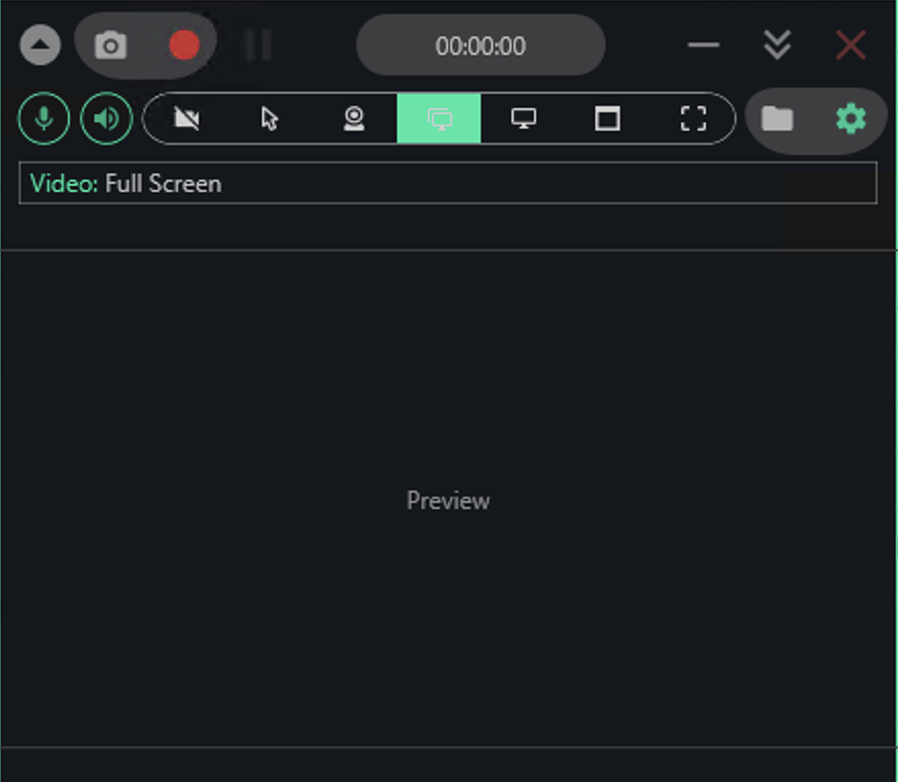
Laptop Screen Recorder app window on Windows
Get started

Start recording in four steps.

You'll be recording within seconds of opening the app.

  1. Extract and open the appRight-click the downloaded file in File Explorer, select Extract All, and launch Laptop Screen Recorder from the folder that appears.
  2. Choose what to captureClick the toolbar buttons to pick Full Screen, Window, Region, or a specific monitor; toggle your mic and speaker icons on or off for audio.
  3. Press the red button or your hotkeyHit the record button in the app window or use your configured global hotkey—recording starts immediately, with no countdown or confirmation dialogs.
  4. Stop and find your filePress the stop button or hotkey; your MP4 appears in the Videos\Laptop Screen Recorder folder, ready to edit or share.
The advantage

Why choose this instead of built-in tools.

Windows Game Bar records fast clips, but stumbles on everyday tasks—it won't touch File Explorer, skips region capture, and forces you through menus.

Real-world results
Inside the appLaptop Screen Recorder window

Capture exactly what you need, cleanly.

Laptop Screen Recorder gives you four ways to frame your capture: full screen for complete recordings, a single window for focused tutorials, a drawn region for zoomed-in details, or a specific monitor when you're working across multiple displays. Every output arrives as a clean MP4 with no watermark burning into the corner.

Full screen or window capturePick your source from the toolbar and record the entire display or just the active window.
Region and monitor selectionDraw a custom rectangle around part of your screen, or target a specific monitor in a multi-display setup.
Clean, watermark-free outputYour MP4 file contains only the recording—no logos, overlays, or branding in the way.
Common questions

Common questions

System needs

What you are downloading.

Version1.0.1
PlatformWindows 10 and 11, 64-bit
InstallPortable, no installer
LicenseMIT, source on GitHub
PriceFree, no account
LanguageEnglish

Download and start recording now.

Extract the file, pick your capture source, and hit record—you'll have a clean MP4 in seconds.

Download for Windows
Latest release · v1.0.1

Laptop Screen Recorder guides